



WhichBingo Members
26 Years of Community: Now Make WhichBingo Yours
WhichBingo Members is a personalised WhichBingo, based around how you play.
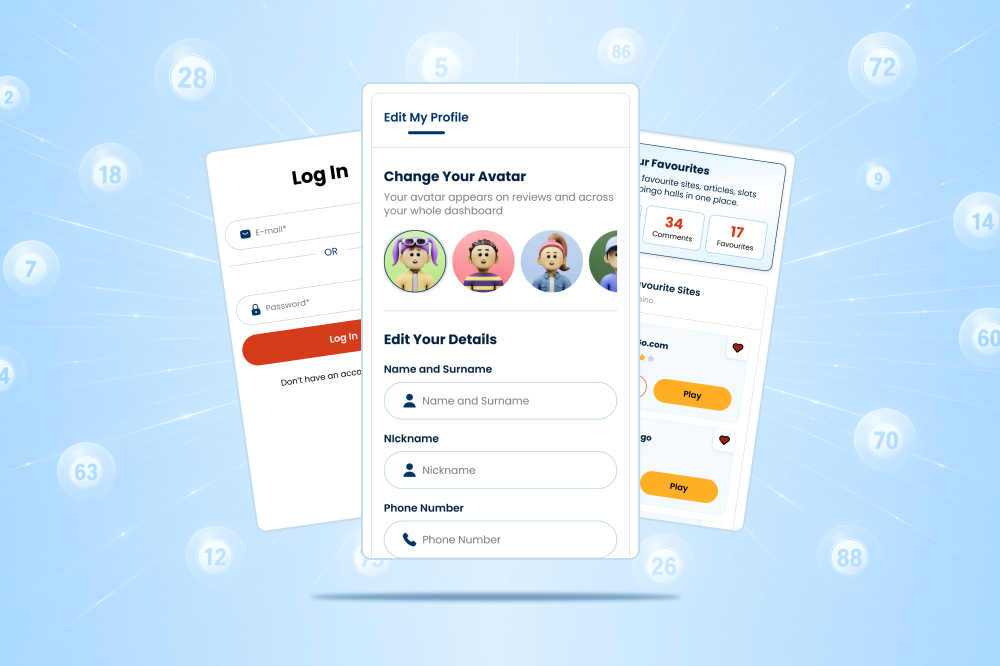
With your free personal WhichBingo account, save your favourite articles and reviews across WhichBingo’s library of bingo, slots and casino reviews, sync those favourites between desktop and mobile, receive recommendations based on preferences such as game type and budget, enter members-only competitions and giveaways, and manage all of it from one dashboard. Sign-up takes three steps: enter an email address and password, set playing preferences, and verify the account by email.
WhichBingo Members launched in September 2026 as WhichBingo’s first personalised-account feature.
Sign Up Now
What You’ll Get As A Member
Your own WhichBingo dashboard
Keep your casino and bingo reviews, favourites, preferences, and activity together in one convenient place.
Save and sync your favourites
Save sites, slots, and news articles for later, then access them across your devices.
Recommendations shaped around you
Tell us what you enjoy, your preferred budget, and the types of offers that interest you. We’ll help narrow down your playing options.
Member exclusives
Be among the first to discover new features, content, offers, and members-only opportunities.
Competitions and giveaways
Access free-to-enter member competitions and giveaways, with new chances to win added regularly.
How It Works
- Create and verify your account
Registration is free, with email verification helping to keep your account secure. - Tell us how you like to play
Choose your preferences so we can make your experience more relevant. - Make WhichBingo yours
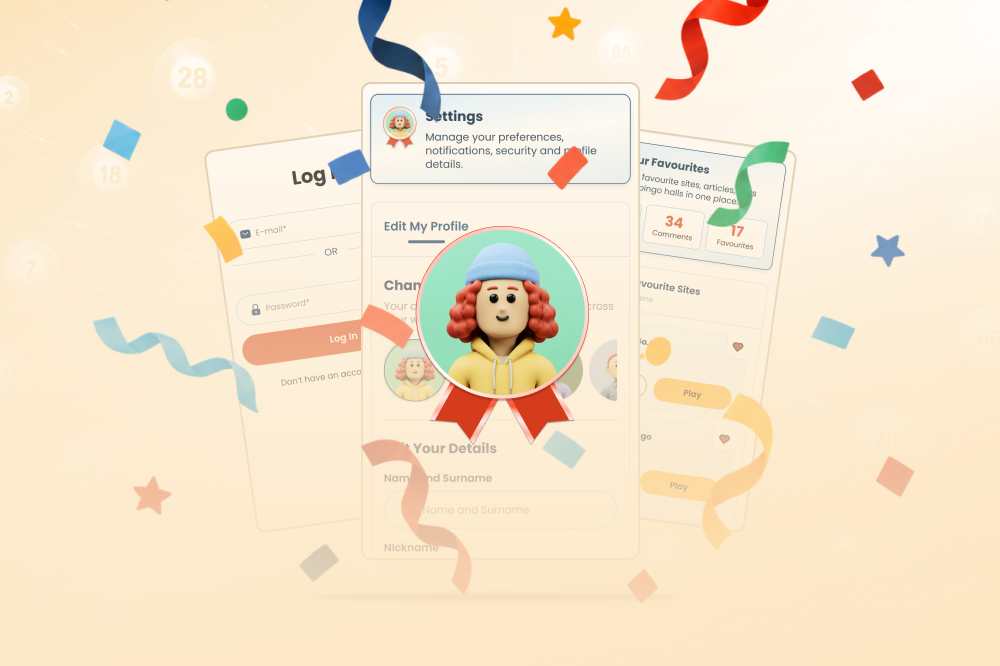
With a WhichBingo login, enjoy favourites, explore personalised recommendations and enter member competitions from your dashboard.
Built for a Community 26 Years in the Making
WhichBingo has helped players compare bingo, slots, and casino sites for 26 years. Membership is the next step: a more useful and personalised way to experience a community you already know.
- More than 520 bingo, slots and casino reviews
- More than 30,000 player opinions
- Winner of the iGB Best Bingo Affiliate Award 2026 and 2025
- Featuring UK-facing sites licensed by the UK Gambling Commission
WhichBingo Members, launched in September 2026, extends this track record into a personalised account: the same reviews and player opinions, now saved, synced and recommended around how each member plays.
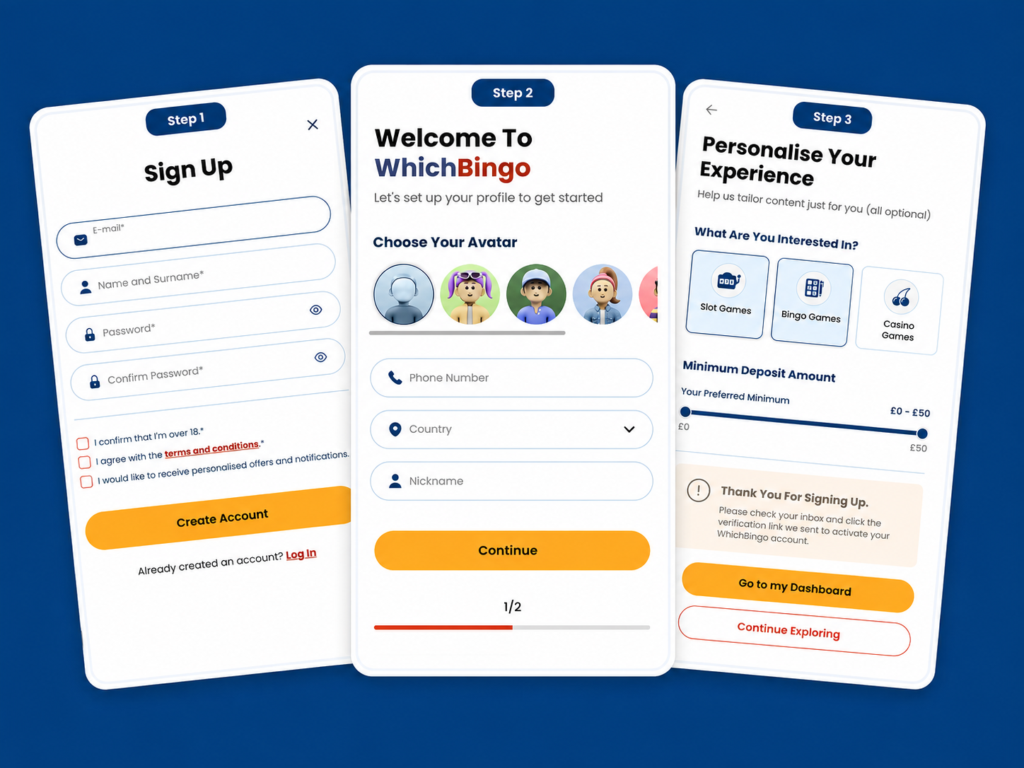
How To Set Up A WhichBingo Account
Step 1
Enter your email, name and surname, a password, and re-enter your password. Tap Create Account.
Step 2
Select an avatar, add your phone number and country of residence, then decide what name you want to be known as. Tap continue.
Step 3
Tell us which type of games you’re interested in and your preferred minimum deposit amount.
Select Go to my Dashboard to see all the new Members features, or Continue Exploring to go back to the site.
Managing Editor Nic McBride on WhichBingo Members

“With 26 years of reviews and opinions behind us, we’re proud of WhichBingo Members. A login that finds you offers suited to how you play, and keeps your reviews and favourites in one place, elevating your WhichBingo experience. It’s for the members who help build this community.”
More to Come
WhichBingo Members will continue to evolve, with new features, benefits and ways to be rewarded planned for the future. For now, use the box below to register:
WhichBingo Members FAQs
Is a WhichBingo account free?
Yes. Creating a WhichBingo account costs nothing and helps us build a dashboard around how you like to play
Do I need an account to use WhichBingo?
No. You can browse reviews, compare sites, and read offers without signing up. An account lets you save favourites across devices and get personalised recommendations.
What can I do with a WhichBingo account?
Save sites, offers, and articles, get matched recommendations, skip re-entering your details on every visit, select your avatar, and manage account details yourself so you can decide how you want to hear from us
Is my information safe?
Yes your information is safe. We will not use your data irresponsibly or illegally. You can read our full privacy policy anytime
How do I create a WhichBingo sign in?
In 3 easy steps you can complete your WhichBingo sign in process. Add your name, email, password, and tick the boxes to confirm you’re 18+ and agree with the T&Cs. Then, choose an avatar, add your phone number and country, then decide what name you want to use. Finally, tell us whether you like bingo, slots or casino (or all three), and what your preferred minimum deposit is. For more details, see the ‘How To Set Up A WhichBingo Account’ above
How do I login to WhichBingo?
Tap ‘login’ located at the top of any WhichBingo page
WB100 T&Cs
These Terms and Conditions (the “Terms”) form a binding agreement between you and the Promoter in relation to the WB100 benefit. Please read them carefully before creating a WhichBingo account for the purpose of WB100 or claiming the WB100 merchandise box. By qualifying for WB100 status, or by claiming the merchandise box, you confirm that you have read, understood and accept these Terms. If you do not accept these Terms, you should not claim the box.
1. Introduction
1.1 These Terms apply to the WB100 benefit offered alongside ordinary WhichBingo membership. They supplement the WhichBingo website Terms and Conditions and Privacy Policy. If there is any conflict or inconsistency between these Terms and the WhichBingo website Terms and Conditions, these Terms prevail in relation to WB100 only.
1.2 WB100 is operated by Grandstand Media Limited (the “Promoter”, “we”, “us” or “our”), a wholly owned subsidiary of Grandstand Limited (Nasdaq: GRSD). The Promoter’s registered office is at Fitzwilliam Court, 3rd Floor
Leeson Close, Dublin 2, Ireland.
1.3 WB100 is not a competition or random draw. Declining or not claiming the merchandise box will not affect a member’s ordinary WhichBingo account. WB100 is a promotional benefit only. It is not a gambling product, no gambling activity, deposit, wager or payment of any kind is required in order to qualify, and qualification is not linked to any gambling operator.
1.4 WB100 is offered in the United Kingdom and Ireland only. It is void where it is prohibited or restricted by law, and the Promoter may exclude any person or territory where offering the benefit would breach any applicable law, regulation or regulatory code.
1.5 WB100 status and the merchandise box are personal to the qualifying member. They are not transferable and may not be sold, assigned, auctioned, gifted or otherwise passed to any other person.
2. Eligibility and allocation
2.1 WB100 is open only to natural persons who are resident in the United Kingdom and Ireland and aged 18 or over. The first 100 eligible users who create a WhichBingo account and verify their email from Tuesday 1st September 2026 will qualify, based on the timestamp recorded by WhichBingo’s systems. The Promoter’s records and systems are the definitive record of the order and timing of qualifying registrations.
2.2 Only one WB100 place is available per person and account. No purchase is required. The Promoter may require satisfactory proof of age (18 and over), identity and UK or Irish residence proof before confirming WB100 status or dispatching a box, and may withhold either until such proof is provided.
2.3 Employees of the Promoter or its affiliated companies, their immediate family members and members of their households, and anyone directly involved in administering WB100, are not eligible.
2.4 A member may hold only one WhichBingo account. If a person attempts to qualify more than once, or to obtain or use more than one account in connection with WB100, the Promoter may disqualify that person, withdraw WB100 status and any box, and exclude them from WB100.
2.5 Members are responsible for keeping their account credentials secure and for all activity carried out through their account. The Promoter may treat any claim submitted through a member’s account as having been made by that member.
3. The WB100 benefit
3.1 Each qualifying member receives WB100 status and may claim one limited-edition WhichBingo branded merchandise box (the “box”). The box contains a selection of WhichBingo branded items, which may include for example a tote bag, playing cards, mug, trolley coin keyring, coaster, pen etc. The items listed are indicative only, and the specific items and their sizes, colours and designs may vary at the company’s discretion.
3.2 The box is non-transferable and has no cash alternative. If necessary, because of circumstances outside the Promoter’s reasonable control, the Promoter may substitute the box or any item with an alternative of equal or greater value.
3.3 The box is produced, fulfilled and delivered by third-party providers. Those providers are not sponsors or co-sponsors of WB100 and are responsible for the quality and performance of the products and services they supply. Their own terms and privacy notices apply to their handling of orders and deliveries. Subject to clause 9.1, the Promoter is not responsible for any act or omission of a third-party provider, except to the extent it is responsible for that act or omission as a matter of law.
3.4 The member is responsible for any personal tax liability arising from receipt of the box.
3.5 All trade marks, logos, designs and other intellectual property appearing on or in the box remain the property of the Promoter or its licensors. Nothing in these Terms transfers any intellectual property rights to the member. The box is for the member’s personal use only and must not be resold, offered for sale, or used for any commercial or promotional purpose without the Promoter’s prior written consent.
3.6 Members are under no obligation to take part in any publicity. The Promoter will not publish a member’s name, image or any other identifying detail in connection with WB100 without that member’s prior consent.
4. Notification and claiming the box
4.1 Qualifying members will be contacted using the email address registered to their WhichBingo account. It is the member’s responsibility to ensure that this address is accurate and current, including checking junk and spam folders. Subject to clause 9.1, the Promoter is not responsible for claim emails that are not received, are delayed, or are filtered or blocked for reasons outside its reasonable control.
4.2 To claim the box, the member must provide a valid UK or Irish delivery address within fourteen (14) calendar days of the first claim email. It may be any address where the members are authorized and able to receive the parcel. The Promoter will send one reminder before the above deadline expires.
4.3 If a valid address is not received by the applicable deadline, the box will be treated as unclaimed and will not be sent. The member will retain their WB100 status and ordinary membership. The Promoter may retain any unclaimed box or, at its sole discretion, offer it to the next eligible member in registration-timestamp order. Any such member will receive the box only and will not acquire WB100 status. The Promoter is under no obligation to offer any unclaimed box to another member, and no member has any right to, or expectation of, an unclaimed box.
5. Delivery
5.1 Members are responsible for providing a complete and accurate delivery address. If an address appears incomplete or incorrect, the Promoter may contact the member to confirm or correct it before dispatch, as stated in clause 4.2.
5.2 Except where required by law, the Promoter is not required to replace, resend or provide any refund or alternative in respect of a box that is lost, delayed, damaged or misdelivered as a result of an incorrect, incomplete or out-of-date address supplied or confirmed by the member, or as a result of the member’s failure to accept or collect the delivery.
5.3 Boxes are expected to be dispatched during the second or third week of October 2026. All dispatch and delivery dates are estimates only, are not of the essence, and may be affected by circumstances outside the Promoter’s reasonable control as described in clause 10.
5.4 The Promoter will bear the cost of standard delivery to a single UK or Irish address. It is the member’s responsibility to facilitate acceptance of the parcel. Where a further delivery attempt is required because the member was unavailable or because the address details supplied were inaccurate or incomplete, the Promoter may treat the box as unclaimed under clause 4.3.
5.5 Risk in and title to the box pass to the member on delivery to the address supplied by the member, or on the first attempted delivery to that address where the member is not available to accept it.
5.6 Boxes will be delivered to UK or Irish addresses only. The Promoter does not deliver to addresses outside the United Kingdom or Ireland, to PO boxes, or to forwarding services.
6. Data protection
6.1 The Promoter is the controller of the personal data processed in connection with WB100. The member’s name, email address, delivery address and other information strictly necessary for fulfilment will be used to administer WB100, to verify eligibility and to produce, dispatch and deliver the box, and will be shared with the external fulfilment and courier providers for those purposes. The lawful bases for this processing are the performance of the Promoter’s obligations to the member under these Terms and the Promoter’s legitimate interests in administering WB100 and protecting the integrity of the campaign against fraud and abuse.
6.2 The member’s delivery-address data will be retained only for as long as necessary to fulfil the purposes for which it was collected, including to facilitate delivery and to manage any delivery issue, return, replacement or query, unless longer retention is required by law, or is necessary for the establishment, exercise or defense of legal claims, or as otherwise described in the Privacy Policy.
6.3 Members have the right to request access to, rectification or erasure of their personal data, to restrict or object to its processing, and to data portability. A member in the United Kingdom may complain to the Information Commissioner’s Office (www.ico.org.uk), and a member in Ireland may complain to the Data Protection Commission (www.dataprotection.ie).
6.4 Personal data will otherwise be handled in accordance with the WhichBingo Privacy Policy: https://www.whichbingo.co.uk/privacy-policy/.
7. Conduct, fraud and misuse
7.1 The Promoter may refuse, suspend or withdraw WB100 status, the merchandise box, or both, and may suspend or close the member’s WhichBingo account, where it reasonably determines that there has been: duplicate, false or automated account creation; the use of false, borrowed or third-party identity or address details; the use of bots, scripts, VPNs, proxies or other means to disguise location or to gain an unfair advantage; fraud, misrepresentation or collusion; or any other abuse of WB100, the WhichBingo website Terms or these Terms.
7.2 Where the Promoter takes action under clause 7.1 it will act reasonably and proportionately and, where it is practicable and lawful to do so, will notify the member and give them a reasonable opportunity to respond before the action takes effect. A member who disagrees with a decision may raise it under clause 11.
8. Changes to WB100 and to these Terms
8.1 The Promoter may amend, suspend or withdraw the merchandise element where reasonably necessary because of circumstances outside its control, provided this does not affect the member’s WB100 status or ordinary WB membership.
8.2 The Promoter may amend these Terms where there is a valid reason to do so, including to reflect a change in applicable law, regulation or regulatory guidance, to reflect a change in the way WB100 is administered, or to correct an error or ambiguity. The Promoter will give members reasonable advance notice of any change that materially and adversely affects them. No amendment will apply retrospectively to a box that has already been validly claimed.
8.3 If WB100 is withdrawn in its entirety, members who have already validly claimed a box will still receive it, except where this is impossible for reasons outside the Promoter’s reasonable control.
9. Liability
9.1 Nothing in these Terms excludes or limits the Promoter’s liability for: (a) death or personal injury caused by its negligence, or the negligence of its employees, agents or subcontractors; (b) fraud or fraudulent misrepresentation; (c) any liability under Part I of the Consumer Protection Act 1987; or (d) any other liability that cannot lawfully be excluded or limited.
9.2 Subject to clause 9.1, the Promoter is not liable for: (a) any loss or damage arising from a member’s failure to provide accurate, complete and current information; (b) any failure of, delay in, or interruption to the WhichBingo website, the registration process or any email or messaging system; (c) any entry or registration that is lost, delayed, corrupted or not recorded for reasons outside the Promoter’s reasonable control; (d) any loss of the opportunity to qualify for WB100; or (e) any loss of profit, loss of revenue, loss of business, loss of anticipated saving, or any loss arising in the course of a member’s trade, business, craft or profession.
9.3 Subject to clause 9.1, the Promoter’s total liability to any member in connection with WB100, whether in contract, tort (including negligence), breach of statutory duty or otherwise, is limited in aggregate to the retail value of the box.
9.4 This clause 9 does not affect a member’s statutory rights as a consumer.
10. Events outside the Promoter’s control
10.1 Subject to clause 9.1, the Promoter is not liable for any delay in performing, or any failure to perform, any of its obligations under these Terms where the delay or failure results from an event outside its reasonable control. Such events include, without limitation: act of God; war, terrorism or civil unrest; natural disaster or severe weather; fire or flood; epidemic, pandemic or public health emergency; industrial action; failure of utilities, telecommunications, payment or transport networks; cyber attack; import, export or customs restrictions; the imposition of tariffs or other trade measures; governmental or regulatory action; and any act or omission of a third party. Where such an event occurs, the Promoter will notify affected members where it is practicable to do so, and the affected obligation will be suspended for the duration of the event.
11. Complaints
11.1 Any question or complaint about WB100 should be sent to [email protected]. The Promoter will acknowledge complaints within five (5) working days and will aim to provide a substantive response within thirty (30) days.
12. General
12.1 The WhichBingo website Terms and Conditions continue to apply to website and account use: https://www.whichbingo.co.uk/terms-conditions/.
12.2 A member may not assign or transfer their rights or obligations under these Terms. The Promoter may assign or transfer its rights and obligations to another company within its group of companies, provided that this does not adversely affect the member’s rights under these Terms.
12.3 If any provision of these Terms is found by a court of competent jurisdiction to be invalid, illegal or unenforceable, that provision will be severed and the remaining provisions will continue in full force and effect.
12.4 These Terms, and any dispute or claim arising out of or in connection with them or with WB100 (including non-contractual disputes or claims), are governed by and construed in accordance with the law of England and Wales. This does not deprive a member resident in Ireland of the protection of the mandatory provisions of Irish consumer law, or a member resident in Scotland or Northern Ireland of the mandatory provisions of the law of the part of the United Kingdom in which they are resident.
12.5 The courts of England and Wales have non-exclusive jurisdiction over any dispute or claim arising out of or in connection with these Terms or WB100. Nothing in this clause affects a member’s right as a consumer to bring proceedings in the courts of the place in which they are resident: a member resident in Scotland or Northern Ireland may bring proceedings in the courts of that part of the United Kingdom, and a member resident in Ireland may bring proceedings in the Irish courts.
Questions about WB100: [email protected]